KOT Software for Restaurants: Complete Guide to Kitchen Order Tickets
DiningHub Team · 9/9/2026
KOT software for restaurants helps restaurants send customer orders directly from the POS to the kitchen, reducing communication errors and improving kitchen efficiency. In this complete guide, learn what KOT is, how a digital KOT system works, the benefits of restaurant KOT software, KOT vs KDS
KOT Software for Restaurants: Complete Guide to Kitchen Order Tickets
When a restaurant gets busy, communication between the waiter, billing counter and kitchen becomes extremely important.
A small mistake in an order can result in:
- Wrong dishes being prepared
- Missing items
- Delayed orders
- Repeated communication
- Customer complaints
- Billing errors
This is why many modern restaurants are moving from handwritten kitchen order tickets to digital KOT software.
A restaurant KOT system connects the ordering process with the kitchen, allowing kitchen staff to receive and manage orders digitally.
In this guide, we'll explain everything you need to know about KOT software for restaurants, including how it works, its benefits and what features you should look for.
What Is KOT in a Restaurant?
KOT stands for Kitchen Order Ticket.
A KOT is an instruction sent to the kitchen containing the items ordered by a customer.
For example, a customer at Table T-5 orders:
- 2 Masala Chai
- 1 Paneer Tikka
- 1 Veg Biryani
- 1 Cold Coffee
The order is sent to the kitchen as a KOT.
Traditionally, restaurants used handwritten paper tickets.
With a digital KOT system, the order can be generated directly from the restaurant POS and sent to the kitchen.
Simple Restaurant Workflow
Customer Order → POS → KOT → Kitchen → Order Ready → Billing
This makes the communication process faster and more organized.
What Is KOT Software?
KOT software is a digital system that automatically creates and sends Kitchen Order Tickets to the restaurant kitchen.
Instead of writing orders manually and physically delivering tickets to the kitchen, staff can enter the order into the POS.
The kitchen receives the order digitally.
A modern KOT system can help kitchen staff see:
- Order number
- Table number
- Order items
- Item quantity
- Special instructions
- Order time
- Order status
- Customer/order type
Depending on the system, KOTs can be displayed on a kitchen screen or printed through a kitchen printer.
How Does KOT Software Work?
A typical digital KOT workflow looks like this:
Step 1: Customer Places an Order
The waiter enters the customer's order into the restaurant POS.
For example:
Table T-10
- 2 Butter Naan
- 1 Paneer Butter Masala
- 2 Masala Chai
Step 2: POS Creates the KOT
The system generates the kitchen order automatically.
Step 3: Kitchen Receives the Order
The KOT appears on the kitchen display or is printed on a kitchen printer.
Step 4: Kitchen Starts Preparing
The kitchen team begins preparing the order.
Step 5: Order Status Is Updated
The kitchen can move the order through statuses such as:
Pending → Preparing → Ready
Step 6: Order Is Served
Once the order is ready, the service team can be informed.
Step 7: Bill Is Generated
The POS keeps the order connected with the customer's bill.
This creates a connected workflow between the front counter and kitchen.
Why Do Restaurants Need KOT Software?
Paper-based KOT systems can work for small operations, but they can become difficult to manage when order volume increases.
Common problems include:
Handwriting Errors
Kitchen staff may misunderstand unclear handwriting.
Lost Tickets
Paper tickets can be misplaced or overlooked during busy periods.
Delayed Communication
Waiters may need to physically carry tickets to the kitchen.
Order Mistakes
Changes made verbally may not reach the kitchen correctly.
Poor Order Tracking
It can be difficult to know whether an order is pending, preparing or ready.
Difficult Reporting
Paper KOTs don't provide useful digital data for analyzing kitchen performance.
KOT software addresses many of these operational challenges by digitizing the communication between POS and kitchen.
Key Features of KOT Software for Restaurants
1. Digital Kitchen Order Tickets
The most basic requirement is the ability to create KOTs digitally.
Orders entered into the POS should reach the kitchen without requiring handwritten tickets.
2. Kitchen Display System
A Kitchen Display System (KDS) displays orders on a screen inside the kitchen.
Instead of managing physical paper tickets, kitchen staff can view active orders on the display.
A typical workflow can be:
Pending → Preparing → Ready
This makes it easier for the kitchen team to prioritize active orders.
3. KOT Printing
Some restaurants still prefer printed kitchen tickets.
A good KOT solution should support kitchen printing where required.
Restaurants can choose a workflow based on their kitchen setup.
4. Order Status Tracking
Order status helps the restaurant understand what is happening with every order.
For example:
🟡 Pending
The kitchen has received the order.
🔵 Preparing
The kitchen is currently preparing it.
🟢 Ready
The order is ready to be served.
This simple workflow can significantly improve communication between kitchen and service staff.
5. Table Number
For dine-in restaurants, the KOT should clearly show the relevant table number.
Example:
Order #1045
Table T-12
This reduces confusion when multiple tables have active orders.
6. Order Type
A restaurant can have different types of orders:
- Dine-in
- Takeaway
- Delivery
- Online orders
A KOT system should clearly identify the order type so the kitchen knows how to handle it.
7. Special Instructions
Customers often have specific requirements.
Examples:
- Less spicy
- No onion
- Extra cheese
- No sugar
- Jain preparation
A digital KOT system can pass these instructions to the kitchen along with the order.
KOT Software vs Manual KOT
| Manual KOTDigital KOT Software | |
| Handwritten tickets | Digital orders |
| Possible handwriting errors | Clear item information |
| Physical ticket movement | Instant digital communication |
| Difficult status tracking | Pending / Preparing / Ready |
| Paper-based records | Digital data |
| Difficult reporting | Better operational reporting |
| More manual work | Automated workflow |
| Difficult to scale | Easier to scale |
The biggest difference is that digital KOT connects the kitchen directly with the restaurant's ordering system.
KOT vs KDS: What's the Difference?
These two terms are often used together, but they are not exactly the same.
KOT — Kitchen Order Ticket
KOT is the actual kitchen order containing the items that need to be prepared.
It can be:
- Printed
- Displayed digitally
- Generated automatically by POS
KDS — Kitchen Display System
KDS is the digital screen/system used by the kitchen to view and manage orders.
So:
KOT = Kitchen Order
KDS = Digital Kitchen Display
A restaurant can use printed KOTs, a KDS, or both depending on its workflow.
Benefits of Using KOT Software
Faster Kitchen Communication
Orders can reach the kitchen directly from the POS.
Fewer Order Errors
Digital item names, quantities and instructions can be easier to understand than handwritten tickets.
Better Kitchen Organization
Kitchen staff can see pending and active orders in one place.
Improved Order Tracking
Staff can identify which orders are pending, preparing or ready.
Better Customer Experience
Fewer mistakes and better coordination can contribute to faster and more consistent service.
Less Paper
Digital KOT workflows can reduce dependency on printed kitchen tickets.
Better Operational Data
Digital orders can provide useful data for restaurant reports and analysis.
How DiningHub Handles KOT & Kitchen Management
DiningHub connects restaurant POS billing with kitchen operations.
When a restaurant staff member creates an order through the POS, the order can move into the kitchen workflow.
The kitchen can manage orders using a simple:
Pending → Preparing → Ready
workflow.
This allows the restaurant team to understand the status of active orders without relying entirely on verbal communication.
DiningHub's restaurant platform combines KOT and Kitchen Display functionality with other restaurant operations such as:
- POS billing
- Table management
- Inventory
- QR ordering
- Online orders
- Payments
- CRM
- Reports
- Analytics
The goal is to create one connected restaurant workflow instead of separate systems for billing and kitchen management.
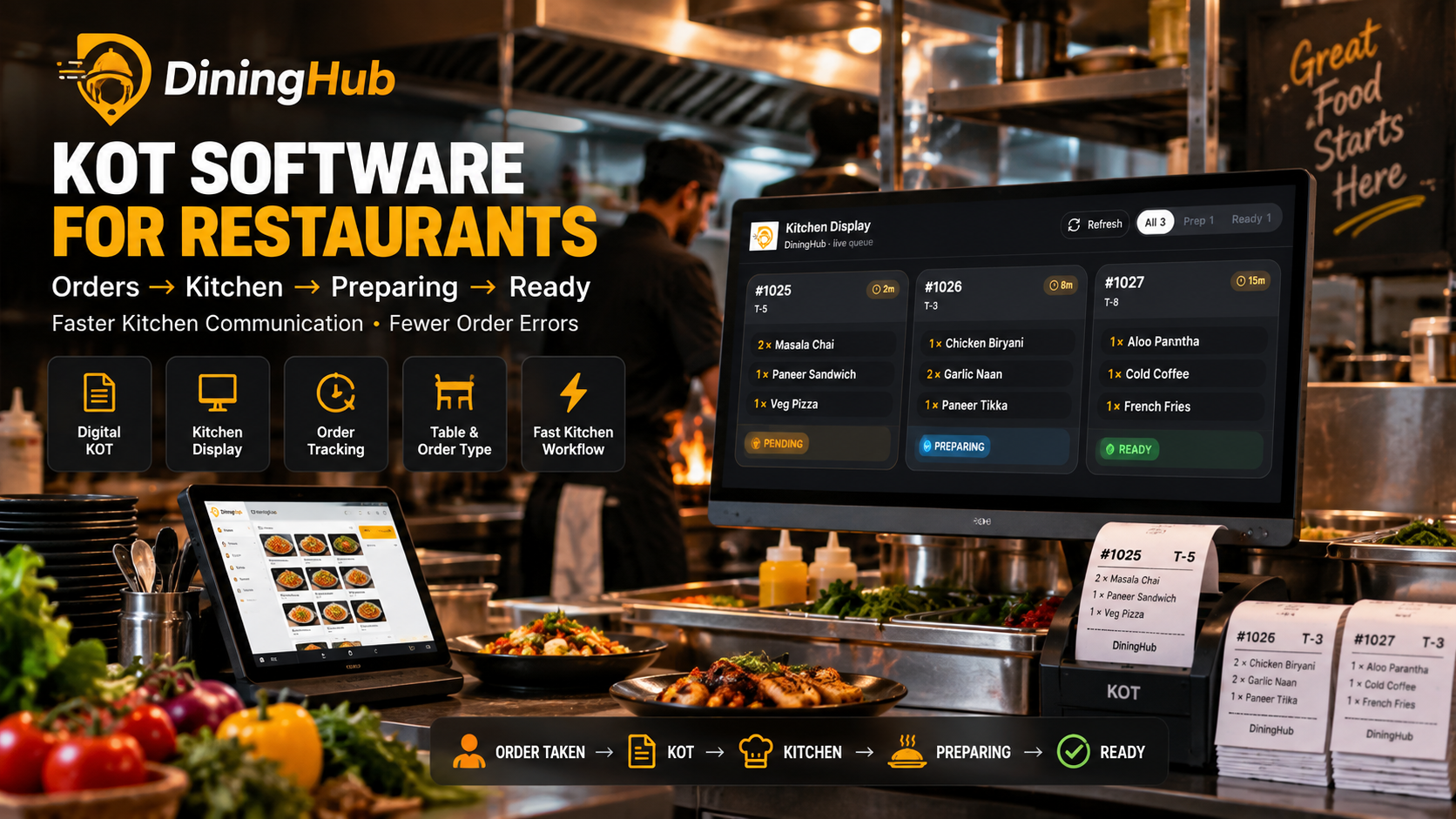
Example: Restaurant KOT Workflow With DiningHub
Imagine a customer visits a café and sits at Table T-5.
The customer orders:
2 × Masala Chai
1 × Paneer Sandwich
1 × Veg Pizza
The waiter enters the order into DiningHub POS.
The order goes to the kitchen.
Kitchen sees:
Order #1025 — Table T-5
2 × Masala Chai
1 × Paneer Sandwich
1 × Veg Pizza
Status: Pending
The kitchen starts preparation.
Status: Preparing
Once everything is completed:
Status: Ready
The service team can then serve the order.
The order remains connected to the restaurant's billing workflow.
This is much more organized than passing handwritten tickets between multiple employees.
What Should You Look for in KOT Software?
Before selecting KOT software for your restaurant, check these features:
POS Integration
The KOT system should connect with your restaurant POS.
Kitchen Display
Check whether the software provides a KDS if you want a paperless kitchen.
KOT Printing
If your restaurant requires printed tickets, verify printer support.
Order Status
Look for clear statuses such as pending, preparing and ready.
Table Management
For dine-in restaurants, table numbers should be clearly associated with orders.
Order Types
Make sure the system supports dine-in, takeaway and delivery workflows.
Special Instructions
Kitchen notes should be clearly visible.
Reporting
Digital KOT data should ideally be available for operational analysis.
Scalability
Choose a solution that can support your restaurant as order volumes and branches grow.
Which Restaurants Can Use KOT Software?
KOT software isn't limited to large restaurants.
It can be useful for:
Restaurants
Manage high-volume dine-in orders and kitchen communication.
Cafés
Manage beverages, snacks and food orders efficiently.
QSRs
Handle fast-moving orders during peak periods.
Cloud Kitchens
Send delivery orders directly into kitchen workflows.
Hotels
Manage restaurant orders alongside larger hospitality operations.
Multi-Branch Restaurants
Standardize kitchen workflows across multiple locations.
Is KOT Software Worth It for Small Restaurants?
Yes.
A small restaurant may have fewer orders, but efficient communication is still important.
If the restaurant currently uses handwritten KOTs, moving to a digital system can help organize:
- Orders
- Kitchen communication
- Order status
- Billing
- Reports
The important thing is to choose software that is simple enough for staff to learn quickly.
How KOT Software Can Improve Restaurant Efficiency
Consider a restaurant where the waiter takes orders manually.
The waiter writes the order, walks to the kitchen, gives the ticket to the kitchen team and later asks whether the food is ready.
Now compare that with a digital workflow:
Order Taken → KOT Generated → Kitchen Receives → Preparing → Ready
The second workflow reduces unnecessary communication steps and gives the restaurant better visibility into active orders.
That's the main value of restaurant KOT software.
Final Verdict
KOT software for restaurants is an important part of modern restaurant operations.
It connects the front-of-house ordering process with the kitchen and can help restaurants improve communication, reduce manual work and track order progress.
The ideal system should combine:
POS + KOT + Kitchen Display + Order Tracking + Billing
rather than treating kitchen operations as a completely separate process.
DiningHub brings these workflows together, allowing restaurants to manage billing, KOT, kitchen operations, tables, inventory, online orders and reporting through one restaurant management platform.
If you're still managing kitchen orders with handwritten tickets, it may be time to move to a digital KOT workflow.