QR Ordering System for Restaurants: Benefits, Setup & Best Practices
DiningHub Team · 9/13/2026
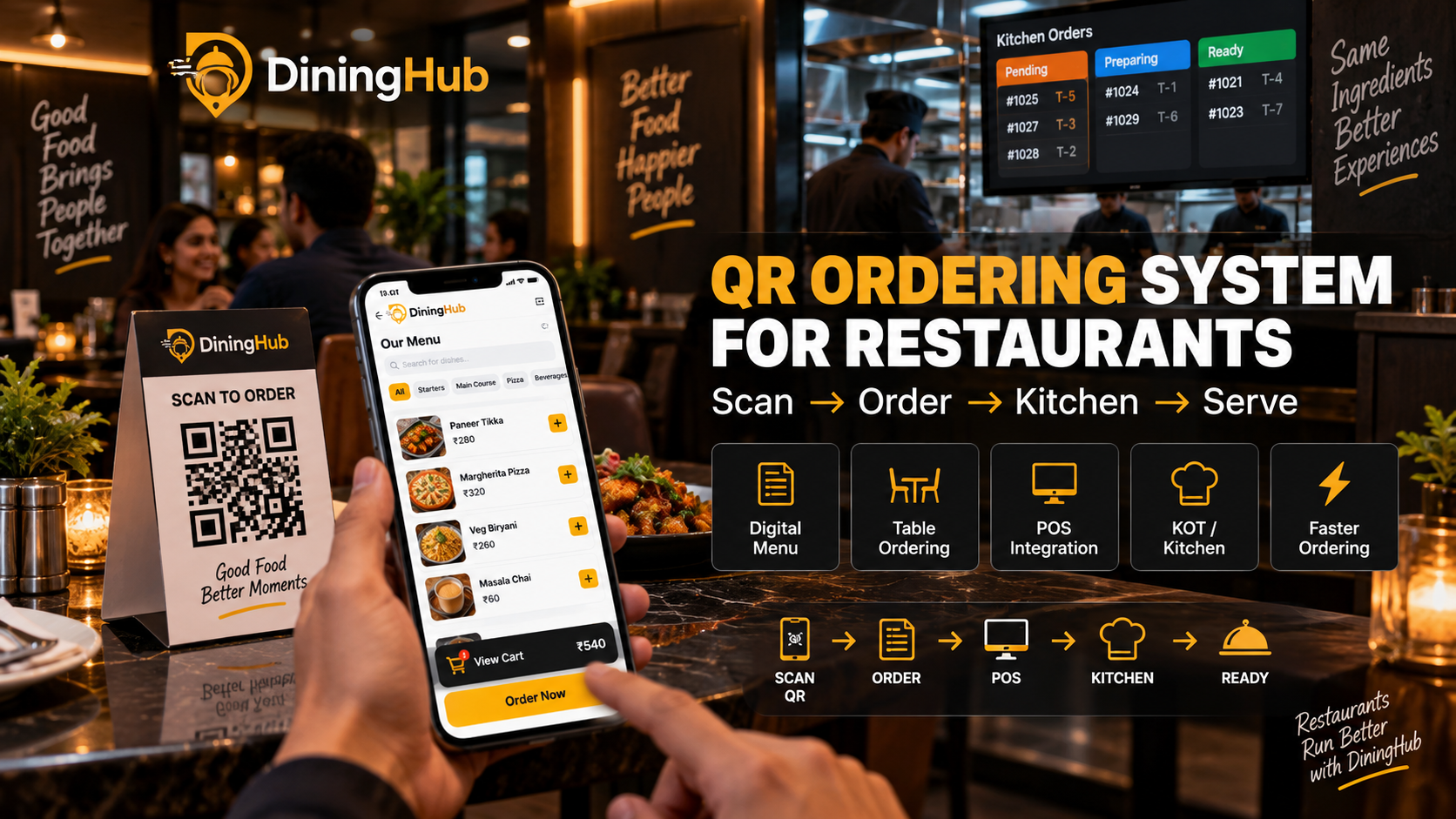
A QR ordering system for restaurants allows customers to scan a QR code, browse the digital menu, place orders, and send them directly to the restaurant’s POS and kitchen. Learn how QR ordering works, its benefits, setup process, best practices, and how restaurants can use it to improve ordering
QR Ordering System for Restaurants: Benefits, Setup & Best Practices
Restaurant technology is changing the way customers discover menus, place orders, and interact with restaurants. One of the simplest technologies restaurants can adopt today is a QR ordering system.
Instead of waiting for a waiter to bring a menu and take an order, customers can simply scan a QR code using their smartphone, view the digital menu, select items, and place their order.
For restaurants, this can reduce manual order-taking, improve order accuracy, speed up service, and connect customer orders directly with the restaurant's POS and kitchen workflow.
In this guide, we'll explain what a QR ordering system is, how it works, its benefits, setup process, and best practices for restaurants.
What Is a QR Ordering System for Restaurants?
A QR ordering system is a digital ordering solution that allows customers to access a restaurant's menu and place orders by scanning a QR code.
The QR code can be placed on:
- Restaurant tables
- Countertops
- Takeaway packaging
- Receipts
- Posters
- Table tents
- Marketing materials
After scanning the QR code, customers can open the restaurant's digital menu on their smartphone without installing an additional application.
Depending on the restaurant's setup, customers may be able to:
- Scan the QR code
- Select their table or order type
- Browse the digital menu
- Customize items
- Add items to cart
- Confirm the order
- Make payment or choose another payment method
- Send the order directly to the restaurant POS
- Have the order forwarded to the kitchen
This creates a connected ordering workflow instead of relying completely on manual order-taking.
How Does QR Ordering Work?
A typical restaurant QR ordering workflow looks like this:
Scan QR → Digital Menu → Select Items → Place Order → POS → Kitchen → Preparation → Serve
Step 1: Customer Scans the QR Code
The customer scans the QR code placed on the restaurant table.
Modern smartphones can usually scan QR codes directly through the camera.
Step 2: Digital Menu Opens
The customer is taken to the restaurant's online menu.
The menu can display:
- Food categories
- Item names
- Prices
- Images
- Descriptions
- Add-ons
- Variants
- Availability
Step 3: Customer Adds Items to Cart
Customers select the dishes they want and add them to their cart.
They can also select available variations or add-ons where supported.
Step 4: Order Is Submitted
Once the customer confirms the order, it is sent to the restaurant's ordering system.
Step 5: Order Reaches the POS
The order can be synchronized with the restaurant POS, reducing the need for staff to manually enter the same order again.
Step 6: Kitchen Receives the Order
The order can then move into the restaurant's kitchen workflow through KOT or a Kitchen Display System.
Step 7: Restaurant Prepares and Serves
Kitchen staff prepare the order and the service team delivers it to the customer's table.
Benefits of QR Ordering for Restaurants
1. Faster Order Taking
One of the biggest advantages of QR ordering is speed.
Customers don't necessarily have to wait for a waiter to become available before browsing the menu or placing an order.
This can be particularly useful during busy periods.
2. Reduce Manual Order Entry
Traditional ordering often requires staff to write down or manually enter customer orders.
QR ordering can reduce duplicate data entry by sending the customer's order digitally into the restaurant's ordering workflow.
This can save staff time and reduce unnecessary manual work.
3. Improve Order Accuracy
Manual order entry can sometimes result in mistakes.
For example:
- Wrong quantity
- Missed item
- Incorrect variation
- Misheard customization
- Incorrect table number
With digital ordering, customers can review their cart before submitting the order.
This can help reduce avoidable ordering mistakes.
4. Improve Customer Experience
Customers increasingly expect fast and convenient digital experiences.
A QR menu allows customers to access the menu directly from their smartphone without waiting for a physical menu.
It also gives customers more control over the ordering process.
5. Digital Menu Updates
Physical menus can become inconvenient when prices, availability, or menu items change.
With a digital QR menu, restaurants can update menu information centrally.
For example, restaurants can change:
- Prices
- Food availability
- Categories
- Item descriptions
- Offers
- Add-ons
- Menu items
This eliminates the need to reprint menus every time something changes.
6. Better Table Ordering Workflow
QR codes can be assigned to individual tables.
This allows the restaurant to identify where an order originated and helps connect the order with the appropriate table.
This can make table service easier to manage, especially in busy restaurants.
7. Reduce Pressure on Restaurant Staff
During peak hours, servers may need to handle multiple tasks simultaneously.
QR ordering can take care of part of the ordering process, allowing staff to focus more on:
- Serving customers
- Food delivery
- Customer support
- Table management
- Upselling
- Restaurant operations
QR ordering doesn't necessarily replace staff; instead, it can help staff work more efficiently.
8. Easy Upselling Opportunities
Digital menus can display relevant add-ons and recommendations.
For example:
Burger → Add Fries → Add Beverage → Add Dessert
Restaurants can use digital menus to promote:
- Combos
- Add-ons
- Premium variants
- Desserts
- Beverages
- Special offers
This can create additional opportunities to increase average order value.
QR Ordering vs Traditional Ordering
| FeatureTraditional OrderingQR Ordering | ||
| Menu access | Physical menu | Digital menu |
| Order taking | Usually staff-operated | Customer can order directly |
| Manual entry | Often required | Can be reduced |
| Menu updates | Reprinting required | Digital update |
| Order accuracy | Depends on manual entry | Customer reviews order |
| Upselling | Staff dependent | Digital recommendations |
| Order integration | May require manual entry | Can connect with POS |
| Speed | Depends on staff availability | Customer can order directly |
The best approach for many restaurants can be a hybrid model, where customers can choose QR ordering while staff remain available for customers who prefer traditional service.
How to Set Up a QR Ordering System for Your Restaurant
Setting up QR ordering doesn't have to be complicated.
Step 1: Choose a QR Ordering Platform
Choose software that supports the features your restaurant needs.
Look for:
- Digital menu
- Table-based QR codes
- POS integration
- Kitchen integration
- Order management
- Payment options
- Menu management
- Inventory synchronization
- Reporting
Step 2: Create Your Digital Menu
Add your restaurant's:
- Categories
- Food items
- Prices
- Images
- Descriptions
- Variations
- Add-ons
- Availability
Keep the menu simple and easy to navigate.
Step 3: Create Table-Specific QR Codes
Generate QR codes for individual restaurant tables.
For example:
- Table 1
- Table 2
- Table 3
- Table 4
Each QR code should correctly identify the table when an order is placed.
Step 4: Print and Place QR Codes
Place QR codes where customers can easily see and scan them.
Common locations include:
- Table stands
- Table stickers
- Menu cards
- Counter
- Restaurant entrance
Make sure QR codes are large enough and easy to scan.
Step 5: Connect QR Ordering With POS
This is one of the most important steps.
A standalone QR menu is useful, but integrating QR ordering with the restaurant POS can make the workflow significantly more powerful.
A connected system can allow:
QR Order → POS → KOT/KDS → Kitchen → Billing
This reduces duplicate data entry and gives restaurant staff a centralized order workflow.
Step 6: Test Before Launch
Before using QR ordering with real customers, test the complete workflow.
Check:
- QR scanning
- Menu loading
- Item selection
- Add-ons
- Cart
- Table identification
- Order submission
- POS synchronization
- KOT generation
- Kitchen display
- Billing
- Payment
Testing the complete workflow helps prevent problems during busy restaurant hours.
Best Practices for Restaurant QR Ordering
1. Keep the Digital Menu Simple
Don't make customers scroll through an unnecessarily complicated menu.
Use clear categories such as:
- Starters
- Main Course
- Pizza
- Burgers
- Beverages
- Desserts
A simple menu improves navigation.
2. Use High-Quality Food Images
Good food photography can make digital menus more engaging.
Use clear images that accurately represent your dishes.
Avoid misleading images that don't match the actual food served.
3. Display Prices Clearly
Customers should immediately understand the price of every item.
Clearly display:
- Item price
- Variations
- Add-ons
- Taxes where applicable
- Applicable charges
Transparency helps build customer trust.
4. Keep Menu Availability Updated
If an item is unavailable, customers shouldn't be able to order it.
Restaurants should regularly update item availability to prevent:
Customer orders unavailable item → Kitchen cannot prepare → Customer disappointment
5. Make QR Codes Easy to Scan
Don't place QR codes in locations where:
- Lighting is poor
- The code is damaged
- The surface is reflective
- Customers cannot easily reach it
Always test the QR code from a customer's seating position.
6. Provide an Alternative Ordering Method
Not every customer will want to use QR ordering.
Keep staff-assisted ordering available for customers who prefer personal service or have difficulty using digital menus.
7. Connect QR Ordering With Your POS
A QR ordering system becomes significantly more useful when connected with the restaurant's POS.
Instead of maintaining separate systems, restaurants can manage orders through a connected workflow.
QR Ordering With DiningHub
DiningHub provides QR Ordering as part of its restaurant management platform.
Instead of treating QR ordering as an isolated digital menu, restaurants can connect customer ordering with their broader restaurant operations.
With DiningHub, restaurants can manage workflows such as:
QR Order → POS → Kitchen/KOT → Order Preparation → Billing
DiningHub also brings restaurant operations such as POS billing, table management, inventory, CRM, loyalty, online orders, payments, and reporting into one platform.
This can help restaurant owners reduce operational complexity and manage their daily restaurant activities from a centralized system.
Who Should Use a QR Ordering System?
QR ordering can be useful for many restaurant formats, including:
Restaurants
Useful for dine-in restaurants looking to speed up table ordering.
Cafés
Customers can scan, browse the menu, and place orders without waiting at the counter.
QSRs
Quick-service restaurants can use QR ordering to improve ordering efficiency.
Cloud Kitchens
QR ordering can complement direct ordering channels and digital customer experiences.
Hotels
QR ordering can be used for restaurant tables and selected guest-service workflows.
Multi-Branch Restaurants
A centralized digital menu and ordering platform can help standardize the ordering experience across locations.
Is QR Ordering Worth It for Restaurants?
For many restaurants, QR ordering can be a practical way to modernize the customer ordering experience.
The biggest value doesn't come from the QR code itself.
The real value comes from connecting the QR ordering experience with the restaurant's operational system.
A QR code that only opens a menu is useful.
A QR ordering system connected to POS, KOT, kitchen operations, billing, payments, and reporting can provide much greater operational value.
Restaurants should therefore evaluate QR ordering software based on the complete workflow rather than simply choosing the cheapest QR menu solution.
Final Thoughts
QR ordering is becoming an important part of modern restaurant technology.
It can help restaurants:
- Speed up ordering
- Reduce manual order entry
- Improve order accuracy
- Digitize menus
- Improve customer convenience
- Promote add-ons
- Connect ordering with POS
- Streamline kitchen operations
However, the most important factor is choosing a system that fits into the restaurant's complete operational workflow.
For restaurants looking for a connected solution, DiningHub combines QR Ordering with POS billing, table management, KOT/Kitchen Display, inventory, CRM, payments, and other restaurant management tools in one platform.