Restaurant POS Software Pricing in India 2026: Plans, Features & Cost Guide
DiningHub Team · 9/22/2026
Restaurant POS software pricing in India varies based on branches, users, features, hardware, integrations, and support. In 2026, restaurants can choose from basic billing systems to complete POS platforms that combine billing, KOT, kitchen display, inventory, QR ordering, CRM, analytics
Restaurant POS Software Pricing in India 2026: Plans, Features & Cost Guide
Choosing restaurant POS software is not only about finding the lowest monthly price.
Restaurant owners need to consider what they are actually getting for that price.
A basic billing system may be inexpensive, but a growing restaurant may also need:
- POS billing
- KOT and Kitchen Display
- GST billing
- QR ordering
- Table management
- Inventory
- Purchasing
- CRM
- Loyalty
- Reports
- Analytics
- Expense tracking
- Staff management
- Offline operation
- Multi-branch management
This is why restaurant POS software pricing in India can vary significantly between different solutions.
In this guide, we'll explain how restaurant POS pricing works, what features affect the cost, and how DiningHub's plans compare for different restaurant requirements.
How Much Does Restaurant POS Software Cost in India?
Restaurant POS software can be available through monthly or annual subscription plans.
The actual cost depends on factors such as:
- Number of branches
- Number of users
- POS terminals
- Kitchen requirements
- Inventory management
- QR ordering
- CRM and loyalty
- Reports and analytics
- Staff management
- Offline functionality
- Hardware
- Support and onboarding
Some systems focus mainly on billing, while others provide a complete restaurant management platform.
Therefore, comparing only the subscription price can give an incomplete picture.
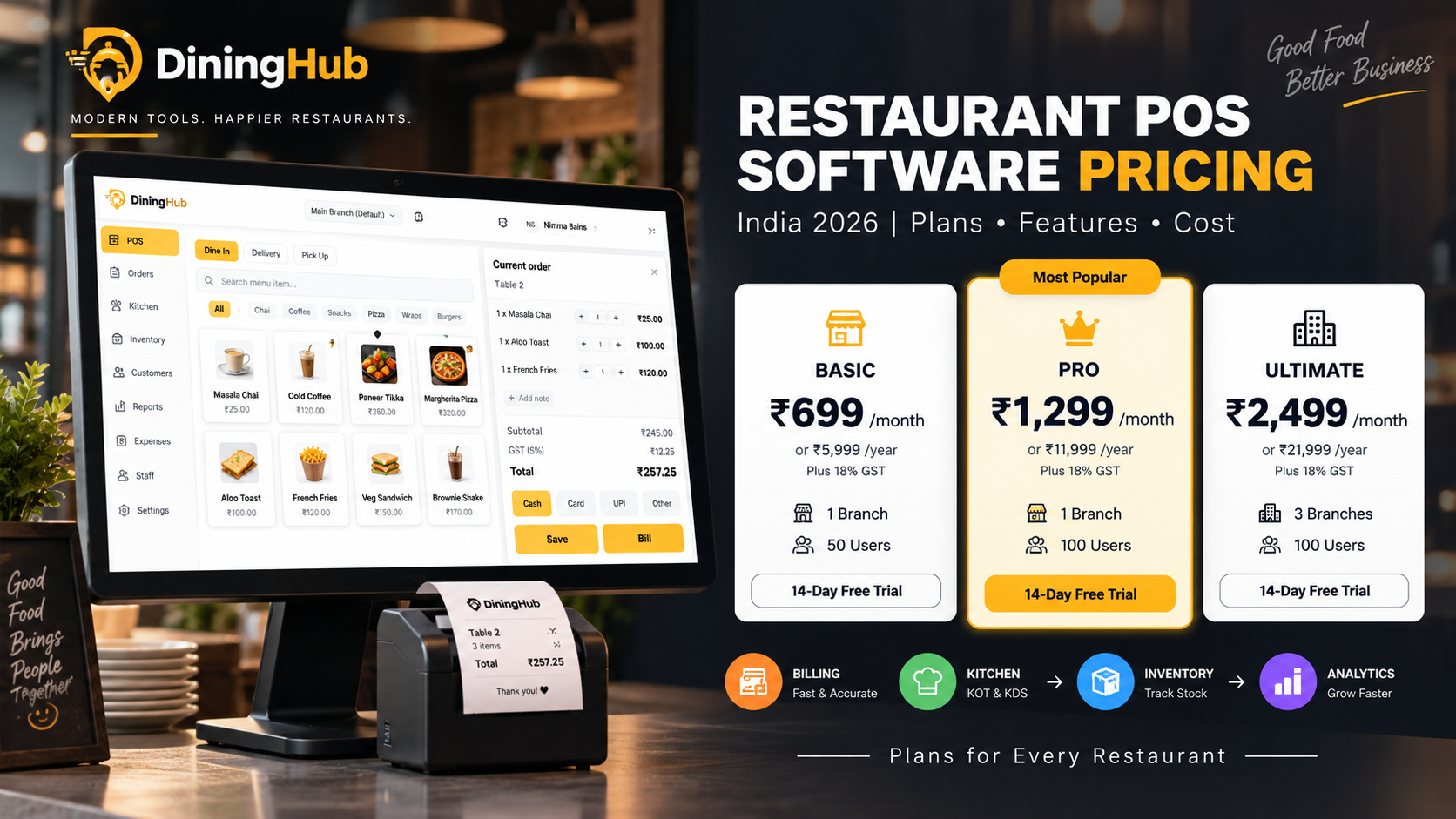
DiningHub Restaurant POS Pricing in India 2026
DiningHub offers three plans designed for different restaurant requirements.
All listed prices are plus 18% GST.
| PlanMonthlyAnnualBranchesUsers | ||||
| Basic | ₹699/month | ₹5,999/year | 1 | 50 |
| Pro | ₹1,299/month | ₹11,999/year | 1 | 100 |
| Ultimate | ₹2,499/month | ₹21,999/year | 3 | 100 |
All plans include a 14-day free trial.
Basic Plan — ₹699/month
Annual Option: ₹5,999/year + 18% GST
The Basic plan is designed for restaurants that need core POS and restaurant management functionality without a multi-branch setup.
Includes:
- 1 Branch
- 50 Users
- POS + Kitchen Display
- QR Ordering & Tables
- Inventory & Purchasing
- CRM & Loyalty
- Reports & Analytics
- Expense Tracking
- Offline Mode
- 14-day free trial
Who is the Basic plan suitable for?
The Basic plan can be suitable for:
- Small restaurants
- Cafés
- QSRs
- Food outlets
- Single-location businesses
- Restaurants starting with a digital POS
For a single restaurant that needs more than basic billing, this plan provides several operational modules in one platform.
Pro Plan — ₹1,299/month
Annual Option: ₹11,999/year + 18% GST
The Pro plan is designed for restaurants that need a higher user limit and additional employee management capabilities.
Includes:
- 1 Branch
- 100 Users
- POS + Kitchen Display
- QR Ordering & Tables
- Inventory & Purchasing
- CRM & Loyalty
- Reports & Analytics
- Expense Tracking
- Employee Attendance
- 14-day free trial
Who is the Pro plan suitable for?
The Pro plan may be useful for:
- Busy restaurants
- Larger cafés
- QSRs
- Restaurants with larger teams
- Businesses requiring employee attendance
- Single-branch restaurants with more users
The higher user limit can make it more suitable for restaurants with larger operational teams.
Ultimate Plan — ₹2,499/month
Annual Option: ₹21,999/year + 18% GST
The Ultimate plan is designed for businesses managing multiple restaurant locations.
Includes:
- 3 Branches
- 100 Users
- POS + Kitchen Display
- QR Ordering & Tables
- Inventory & Purchasing
- CRM & Loyalty
- Reports & Analytics
- Expense Tracking
- Employee Attendance
- 14-day free trial
Who is the Ultimate plan suitable for?
The Ultimate plan can be considered by:
- Restaurant chains
- Businesses with multiple outlets
- Growing restaurant brands
- Multi-location cafés
- QSR groups
- Restaurant owners who need centralized management across branches
The biggest difference is the support for 3 branches, making it more relevant to multi-location operations.
DiningHub Pricing Comparison
| FeatureBasicProUltimate | |||
| Monthly Price | ₹699 | ₹1,299 | ₹2,499 |
| Annual Price | ₹5,999 | ₹11,999 | ₹21,999 |
| GST | +18% | +18% | +18% |
| Branches | 1 | 1 | 3 |
| Users | 50 | 100 | 100 |
| POS | ✓ | ✓ | ✓ |
| Kitchen Display | ✓ | ✓ | ✓ |
| QR Ordering | ✓ | ✓ | ✓ |
| Table Management | ✓ | ✓ | ✓ |
| Inventory | ✓ | ✓ | ✓ |
| Purchasing | ✓ | ✓ | ✓ |
| CRM | ✓ | ✓ | ✓ |
| Loyalty | ✓ | ✓ | ✓ |
| Reports & Analytics | ✓ | ✓ | ✓ |
| Expense Tracking | ✓ | ✓ | ✓ |
| Employee Attendance | — | ✓ | ✓ |
| Offline Mode | ✓ | — | — |
| 14-Day Free Trial | ✓ | ✓ | ✓ |
Note: Pricing and feature availability should always be confirmed before purchase because plans can change.
Monthly vs Annual Restaurant POS Pricing
When comparing restaurant POS software, check both monthly and annual pricing.
DiningHub provides both options.
Monthly plans
Monthly subscriptions can be useful when a restaurant wants:
- Lower initial commitment
- Flexible subscription management
- Time to evaluate the software
Annual plans
Annual subscriptions can be useful for restaurants that have already decided on their POS platform and want to use an annual plan.
DiningHub's current annual pricing is:
- Basic: ₹5,999/year + 18% GST
- Pro: ₹11,999/year + 18% GST
- Ultimate: ₹21,999/year + 18% GST
Always compare the total annual cost, features, branch limits, and user limits rather than looking at only the monthly equivalent.
What Is Included in Restaurant POS Software Pricing?
The subscription price is only one part of the total cost.
Before choosing a POS, check what is included.
POS Billing
The POS should make it easy for staff to create and manage restaurant orders and bills.
Important workflows can include:
- Dine-in
- Takeaway
- Delivery
- Multiple payments
- Discounts
- Order management
KOT and Kitchen Display
Restaurant POS software can connect front-of-house ordering with kitchen operations.
A typical workflow is:
Order → POS → KOT → Kitchen Display → Preparing → Ready
This can reduce manual communication between servers and kitchen staff.
Inventory Management
Inventory management can help restaurants monitor:
- Stock
- Purchases
- Warehouses
- Stock movement
- Low-stock items
- Items and SKUs
For restaurants with significant inventory, this feature can be an important part of the overall POS value.
QR Ordering and Table Management
Modern restaurant POS systems may also include QR ordering.
Customers can scan a table QR code, browse the menu, and place an order.
The order can then move into the restaurant's POS and kitchen workflow where supported.
Table management can also help staff manage restaurant floor operations.
CRM and Loyalty
Restaurant CRM features can help businesses maintain customer information and support loyalty initiatives.
Depending on the platform, restaurants may use CRM functionality for:
- Customer profiles
- Visit history
- Loyalty
- Campaigns
- Customer engagement
Reports and Analytics
A restaurant POS should provide more than a billing screen.
Useful reports can help owners understand:
- Sales
- Best-selling items
- Payment methods
- Order types
- Revenue trends
- Branch performance
- Business activity
Reports can help restaurant owners make decisions using actual operational data.
What Other Costs Should Restaurants Consider?
When comparing restaurant POS pricing in India, don't look only at the software subscription.
Consider the complete setup.
1. POS Hardware
Depending on your setup, you may need:
- Computer or tablet
- Touchscreen
- Thermal printer
- Kitchen printer
- Kitchen Display
- Cash drawer
- Barcode scanner where required
- Network equipment
Hardware requirements vary by restaurant.
2. Internet and Network
Restaurants using cloud-based systems need a reliable network environment.
Consider:
- Internet connection
- Wi-Fi coverage
- Router
- Local network
- Backup connectivity where necessary
If offline functionality is important, verify exactly how the software behaves during an internet interruption.
3. Payment Processing
Restaurants may also use payment services for:
- UPI
- Cards
- Wallets
- Online payments
Check whether payment processing fees or third-party charges apply separately.
4. Setup and Onboarding
Ask whether the provider includes:
- Account setup
- Menu setup
- Staff setup
- Training
- Data migration
- Technical support
These services can affect the overall implementation cost.
What Should You Look for When Comparing Restaurant POS Pricing?
Don't choose a POS simply because it has the lowest monthly subscription.
Compare the following:
1. Features
Does the plan include the features your restaurant actually needs?
2. Users
How many staff members can use the system?
3. Branches
Can the software support your current and future outlets?
4. Hardware
Does it work with your required hardware setup?
5. Kitchen
Does it support KOT or Kitchen Display workflows?
6. Inventory
Can you track purchases and stock?
7. Reports
Can you access the reports required to manage the business?
8. Offline Capability
What happens if your internet connection goes down?
9. Support
What type of customer support is included?
10. Scalability
Can you upgrade when your restaurant grows?
Which DiningHub Plan Should You Choose?
The right plan depends on your restaurant's size and operational requirements.
Choose Basic if:
- You have 1 branch
- You need up to 50 users
- You need core POS features
- You need inventory and purchasing
- You need QR ordering and tables
- You want offline mode
Choose Pro if:
- You have 1 branch
- You need up to 100 users
- You need employee attendance
- You have a larger restaurant team
- You need the same core POS and management features
Choose Ultimate if:
- You manage multiple branches
- You need up to 3 branches
- You need up to 100 users
- You want multi-location restaurant management
Is Cheap Restaurant POS Software Always Better?
Not necessarily.
A lower-priced POS may provide basic billing but may not include the operational tools your restaurant needs.
For example, if you later need:
- Inventory
- KOT
- QR ordering
- Reports
- Staff management
- Multi-branch management
you may need to purchase additional software or services.
This is why restaurants should compare total value and total cost, not just the starting subscription price.
Restaurant POS Pricing by Business Type
Small Café
A small café may primarily need:
- Fast billing
- Payments
- Basic inventory
- Reports
- QR ordering
A single-branch plan may be enough.
QSR
A QSR may need:
- Fast POS
- KOT/KDS
- Multiple payment methods
- Inventory
- Reports
- High user capacity
Cloud Kitchen
A cloud kitchen may prioritize:
- POS
- Online orders
- Kitchen workflow
- Inventory
- Reports
Fine-Dining Restaurant
A fine-dining restaurant may need:
- Table management
- POS
- KOT/KDS
- Split billing
- Multiple payments
- CRM
- Customer loyalty
Multi-Branch Restaurant
A growing restaurant chain may need:
- Multiple branches
- Centralized management
- Branch-wise reports
- Inventory
- Staff management
- Consistent POS workflows
Why Compare Restaurant POS Pricing Before Buying?
Choosing a POS is a business decision because it can affect daily restaurant operations.
A good comparison should answer:
- What does the plan include?
- How many branches are supported?
- How many users can access it?
- Is KOT included?
- Is inventory included?
- Is QR ordering included?
- Are reports included?
- Is offline functionality available?
- What hardware is required?
- What support is available?
- How much will the restaurant pay annually?
Answering these questions before purchasing can help avoid unexpected costs later.
DiningHub: Restaurant POS Pricing With Core Operations Included
DiningHub combines POS billing with restaurant management features rather than focusing only on invoice generation.
Depending on the selected plan, restaurants can access features such as:
POS + Kitchen Display
QR Ordering + Tables
Inventory + Purchasing
CRM + Loyalty
Reports + Analytics
Expense Tracking
Employee Attendance
Offline Mode
Multi-Branch Management
The plans start at ₹699/month + 18% GST, with a 14-day free trial available across the listed plans.
Restaurants can select a plan based on their branch count, users, and operational requirements.
Final Thoughts
Restaurant POS software pricing in India depends on much more than the monthly subscription.
Before choosing a system, compare the complete package:
Software + Features + Users + Branches + Hardware + Support + Scalability
For a single restaurant, a basic plan may be sufficient.
For a larger team, a higher user limit and employee management may be more important.
For restaurant chains, multi-branch support becomes a major consideration.
DiningHub currently offers three plans:
- Basic — ₹699/month
- Pro — ₹1,299/month
- Ultimate — ₹2,499/month
Annual plans are also available, with 18% GST applicable.
All three plans include a 14-day free trial, allowing restaurants to evaluate the platform before committing.